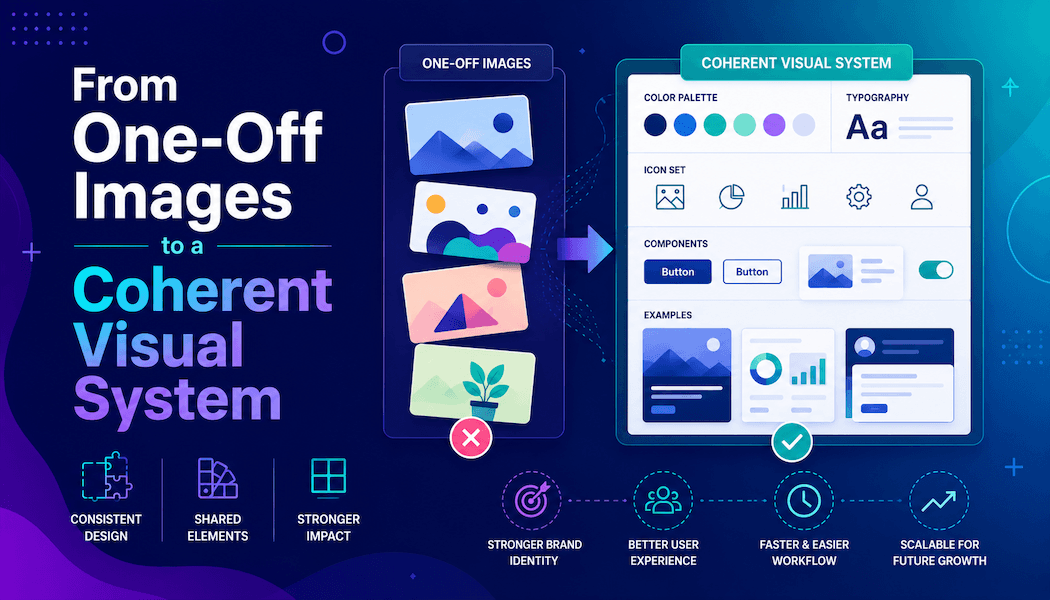
From One-Off Images to a Coherent Visual System
A single attractive image is easy to admire and hard to build upon. The real design challenge appears when a landing page needs a hero, three feature illustrations, social previews, and campaign graphics that all feel related. Generating each asset from scratch often produces a collection of competing styles. A reference-based platform such as Nano Banana gives designers another starting point: define a visual direction once, then use prompts and existing images to develop controlled variations. The goal is not identical output, but a recognizable system across every touchpoint.
Define the System Before Producing Assets
A visual system needs more than a color palette. Write down the features that should remain stable: camera distance, lighting direction, background complexity, texture, subject placement, and level of realism. These choices create the visual grammar of the project.
For example, a finance app might use centered objects, soft side lighting, restrained shadows, and simple architectural backgrounds. A children’s learning product might use rounded forms, visible paper texture, and playful scale. The description should be specific enough to guide generation but flexible enough to support different scenes. Without this foundation, each prompt becomes a new art direction meeting, and consistency depends on luck. Add two sample crops to the system notes: one wide and one square. A visual direction that works only in a cinematic frame is not yet a usable system for product pages and social channels.
Build a Small Reference Board With Clear Roles
Do not collect twenty attractive images and call them a mood board. Choose a small set and assign a purpose to each reference. One may define lighting, another composition, another surface texture, and another character or product identity.
This role-based approach prevents contradictory references. A glossy commercial photograph and a rough editorial collage may both look appealing, but mixing them without a hierarchy produces confused results. Add one sentence beneath every reference explaining what should be borrowed and what should be ignored. The board then becomes an instruction tool rather than a gallery of preferences. Review it in grayscale as well. If the hierarchy disappears without color, the references may depend too heavily on palette and not enough on shape, spacing, or light. That weakness will surface when assets are cropped, compressed, or placed beside strong interface elements. It also makes feedback more precise when several designers review the output.
Create a Three-Level Asset Family
A coherent project usually needs assets at different levels of complexity. Plan those levels before generating a large batch.
1. The Hero Image Sets the Rules
The hero carries the strongest composition and the clearest expression of the visual direction. Spend time refining it because later assets will refer back to its lighting, perspective, and material treatment. Keep the main message simple. A hero that includes every feature leaves no room for the rest of the page. Once approved, record the final prompt, references, and the details that should remain stable across the family.
2. Supporting Images Reuse the Grammar
Feature illustrations should not compete with the hero. Reuse the same light, background behavior, and object treatment while changing the action or subject. Nano Banana AI supports working with multiple reference images, which can help designers carry selected qualities from an approved visual into new scenes. Use references deliberately: one for identity and one for style is often easier to control than several images with overlapping roles.
3. Utility Assets Simplify the System
Thumbnails, cards, and social crops need less detail. Reduce the number of objects, strengthen the silhouette, and protect the central subject from cropping. These assets should still belong to the same family, but they do not need the hero’s cinematic complexity. A simplified version often performs better at small sizes and is easier to reuse. Think of it as the visual system speaking in a shorter sentence.
Use Prompt Constants and Prompt Variables
Separate every prompt into two parts. Constants describe the elements that should remain stable across the project. Variables describe the current scene. A constant might specify soft directional light, matte materials, a neutral background, and a three-quarter camera angle. The variable might request a phone, a dashboard card, or a person completing a task.
Store the constants in a shared document. Designers can then change the subject without rewriting the art direction. This also makes failed generations easier to diagnose. Version the constants instead of silently changing them. A label such as “System 1.2—softer shadows and less background texture” allows the team to understand why later assets look different and prevents old prompts from returning to the workflow. If the whole family drifts, adjust the constants. If one scene fails, revise only the variable. The method creates consistency without forcing every image into the same composition.
Review Relationships, Not Isolated Images
An image may look strong alone and still weaken the page. Place early outputs into the real layout before approving them. Check whether several illustrations use the same visual weight, whether faces look like different campaigns, and whether background detail creates noise when the images appear together.
Use a contact sheet or page mockup to compare the family at once. Include real headings, buttons, and interface colors in the mockup. An image family may appear cohesive on a blank board but clash with the product once surrounding elements are restored. Context is part of the review, not a final decoration step. Remove the strongest outlier if it breaks the system, even when it is individually impressive. Design quality comes from relationships. A restrained set that guides the user through the page is more valuable than five award-worthy images fighting for attention.
Plan Variation Without Losing Recognition
Consistency does not mean repetition. Change one major dimension at a time: subject, scale, color emphasis, or camera distance. Keep the other system rules stable. This creates variation that feels intentional rather than random.
For a campaign, the hero may use a wide environment, feature images may use medium scenes, and social cards may use close-up objects. The perspective changes, but the light and material language remain recognizable. Style transfer can also create alternate treatments, yet it should be applied to the family as a planned branch, not to random individual assets. Name each branch so the team knows where it belongs. Limit active branches during one campaign. Too many approved styles create the same inconsistency the system was meant to prevent. A seasonal branch should have a start, an end, and a clear relationship to the core visual rules.
Document decisions for the next designer. A visual system becomes valuable when another person can continue it. Save approved references, prompt constants, rejected examples, crop guidance, and a few notes on common failures. A short document is enough if it shows what to preserve.
Include a “do not” section. It might prohibit busy backgrounds, frontal camera angles, glossy plastic, or dense text inside images. Negative guidance prevents the system from slowly drifting as new assets are added. The next designer should not have to reverse-engineer the project from final exports. They should receive a usable set of decisions that turns consistency into a repeatable process.
Conclusion
The best use of AI image generation in design is not producing more disconnected pictures. It is extending a clear visual idea across the places where a product meets its audience. Define the grammar, assign roles to references, build assets at three complexity levels, and review them inside the real layout. This approach leaves room for variation while protecting recognition. As campaigns increasingly pair static assets with short motion content, some teams extend the same visual grammar into video using a model like Seedance 2.5, applying the same constants lighting, camera distance, material treatment so the moving assets stay recognizable alongside the still ones. Start by choosing one approved image from an active project and write down the five visual rules that its next companion image must follow.