How to Create Your Own Generative AI Solution in 2026
It's no longer just an experiment; generative AI has become a critical component of business innovation. Chatbots that respond to customer inquiries and image generators that quickly produce logos are just two examples of the many ways generative models are changing our processes, methods, and even thought patterns. If you've been thinking about designing your own generative AI solution for 2026, this guide will outline the complete process to build a system that offers value.
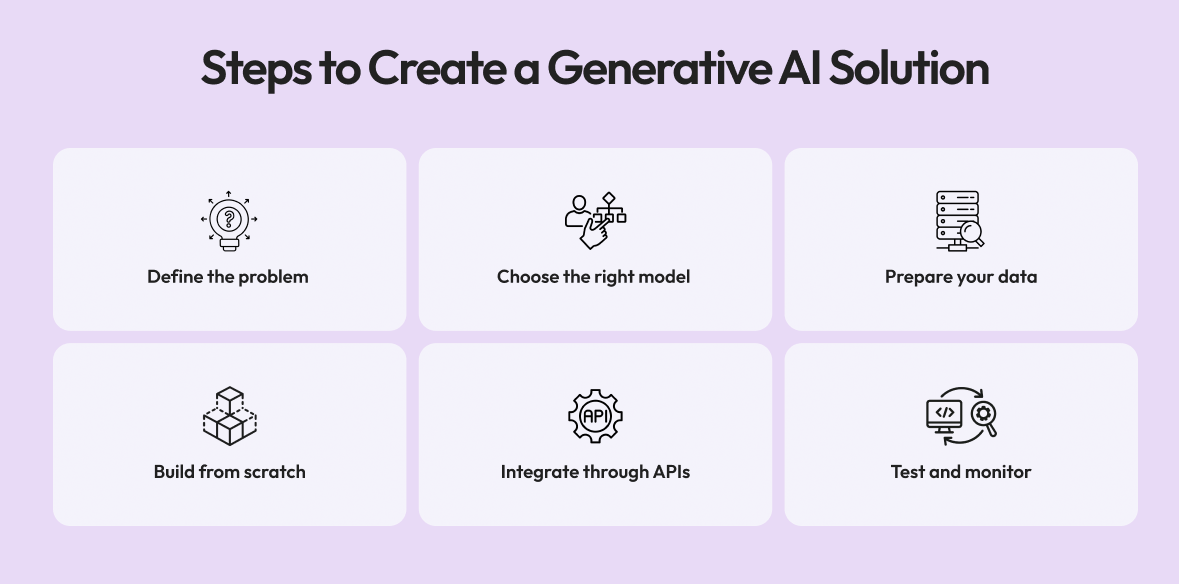
Step 1: Define the Problem You’re Solving
Before you write code for a generative AI product, you must know what your objective is when using generative AI. This goal will ultimately drive all your technical choices throughout development. For example, you may want to automate content creation for marketing teams. Create a coding assistant for developers, or provide product mockups and 3D designs to enable faster iteration.
If your objective is to automate content creation, then you will want to use large language models, such as GPT or Claude, which are great for generating text and context. If your objective is visual design, then you will want to use a diffusion model, such as Midjourney or Stable Diffusion, that is adept at generating images.
In terms of actual business applications, building SaaS with generative AI has the potential to make a significant impact. For example, a retail company may utilise generative AI to produce hundreds of customised advertisement texts or images for each of its target audience segments, which is far less than the amount of time that it would take for a marketing team to create these from scratch over time.
Step 2: Choose the Right Model Type
AI models can be divided into categories based on output type (text, audio, music, video, image, etc.). The most common are: text-generation models (e.g, GPT-V5, Claude, Gemini) that focus on write support, code assistance, conversation support; visual-generation models that assist with visual and design tasks; audio/music-generation platforms (e.g., Suno, Music LM ), and video generation systems (e.g., Runway, Pika, Sora) for storytelling, promotional video production, and motion content creation.
A pre-trained language model is usually the quickest way to build an AI chatbot through API access from your preferred provider (e.g., OpenAI, Anthropic, Google). Open-source image generation models offered on various sites provide the greatest opportunity for customisation and can be fine-tuned to meet the visual goals of brands.
By 2026, Hybrid AI, which has an integrated understanding of text and images, will be increasingly popular as users will express ideas in natural language and receive a visual representation of the concept in real-time, reducing the time from idea to execution.
Step 3: Collect and Prepare Your Data
The data used to generate AI is critical to the performance of that AI model. For example, in order to properly train a generative AI system (like an AI Assistant designed to help lawyers), the training set must contain high-quality, domain-specific materials that accurately represent real-world cases. This includes case summaries, contracts, regulatory texts, etc.
The amount of data you have is less important than how clean it is. When training any model, having several thousand clean, closely related examples will almost always outperform millions of noisy, inconsistent examples. The data preparation process plays a key role in this. You should take the time to remove any duplicate entries, irrelevant examples, and any examples that contain a large bias/low-quality information when preparing your dataset.
Synthetic data generation is expected to be in widespread use by 2026. As a result, many organisations are now using one generative AI model to train other generative AI models, enabling teams to quickly create larger datasets and maintain privacy; at the same time, they are supporting increased diversity in training datasets by reducing reliance on sensitive/hard-to-obtain real-world data.
Step 4: Fine-Tune or Build from Scratch
Training a model from scratch takes a large amount of computing resources and months of effort. For this reason, companies prefer to fine-tune pre-trained models. Fine-tuning is the process of modifying an already built model so it can be adapted to the unique needs of your domain or use case without having to create all of the intelligence from scratch.
In order to lower technological risk, expedite deployment, and guarantee that the model complies with regulatory regulations and commercial objectives, many companies opt to collaborate with specialized gen AI development services.
Depending on the business context, the process of fine-tuning a model may differ. For example, a travel agency may take the pre-trained GPT-based model and use destination guides, booking data, and customer reviews to fine-tune the model and provide optimal recommendations.
Fine-tuning may be done through platforms such as Hugging Face, OpenAI's Fine-Tuning API, or other small cloud platforms that specialise in private or on-premise solutions. The main advantage of fine-tuning a model in this way is that you maintain the very high reasoning capabilities of the large, well-proven model and provide the model with the language, context, and domain knowledge required for your business.
Step 5: Integrate Through APIs or Apps
Next, assuming your model acts as intended, you will need to develop a product that users can use. Integration is when the generative AI model meets your end users and adds value for your customers and/or company. In a business environment, integration generally refers to including the generative AI Model as a part of existing systems, for example, the CRM, Customer Support Chat Bot, or analytics dashboard, to name a few.
For those with a focus on developer products, typically, the generative AI Model becomes available as an application programming interface (API) that developers can access through their own systems, third-party tools, and services used by their customers. Since the customer is the end user, developers need to ensure the generative AI Model provides an easy and intuitive experience, closely mimicking that of an experienced, professionally developed web/mobile application.
By 2026, low-code AI platforms will significantly simplify the integration process. Developers can use tools such as LangChain, Dust, and Flowise that allow development teams to connect user interfaces, workflows, and automation tools to create an AI-based product without needing to create a large backend system from scratch.
In general, the degree of success a generative AI product will achieve depends on the user interface of the product and the customer's experience with the model, rather than solely the quality of the generative AI model itself.
Step 6: Test and Monitor
A generative AI solution will likely not be a perfect solution at its launch, which is to be expected. Effective testing combines both quantitative metrics (such as accuracy and coherence) and qualitative metrics (such as tone and user satisfaction). You'll want to track when your model produces ‘off-topic’ or ‘low-quality’ outputs so as to learn about where and why it failed.
As a result of this expectation, many teams have begun implementing ‘human feedback loops’ in which users can rate/comment upon their AI-generated responses. This becomes an ongoing source of information for improvement and enables the model to evolve based on user expectations in the real world.
By 2026, there will likely exist multiple AI observability platforms that will play a vital role within this process. AI observability platforms are designed to monitor model behaviour in real-time and will also provide an automatic flagging mechanism for problematic behaviours (e.g., hallucinations or bias) or performance degradation before they reach a significant scale where they may negatively impact end users.