What Are WooCommerce Product Badges and How Can They Increase Sales?
Your store has products. Good products. But customers scroll past them. No urgency. No reason to notice. No reason to buy now instead of later.
Then you add a badge. A simple visual indicator. "Sale" badge. "New Arrival" badge. "Limited Stock" badge. Suddenly, that product gets attention. Customers click. Customers convert. The difference between being seen and being invisible is often just one badge.
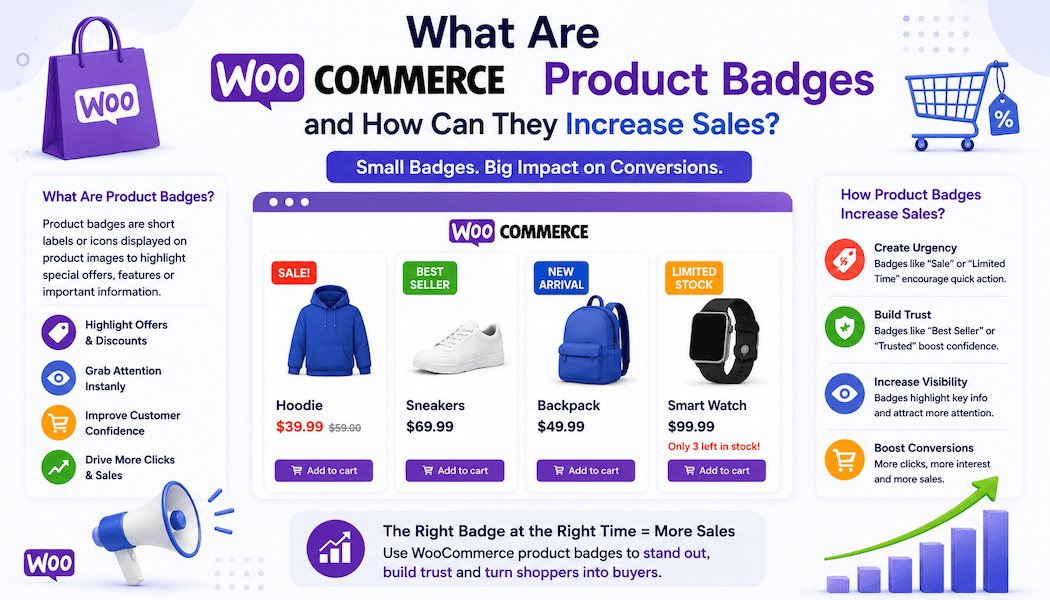
WooCommerce product badges are visual labels that appear directly on product images. They communicate value. They create urgency. They highlight what matters most about a product. They work because humans are visual creatures. Text alone doesn't grab attention the same way a visual badge does.
Most stores use the default WooCommerce sale badge. Plain. Forgettable. But custom product badges? Those grab attention. Those communicate specific messages. Those drive actual conversions.
This is why understanding product badges and how to use them strategically matters. They're not flashy. They're not complicated. But they're conversion multipliers.
What Are WooCommerce Product Badges?
A product badge WooCommerce is a visual label that appears on product images to highlight specific information or promotions.
Think of it like this. Traditional retail stores use physical tags on products. "Sale" stickers. "New" labels. "Clearance" tags. product badges do the same thing digitally. They sit on product images communicating important information instantly.
A WooCommerce product labels system displays these badges prominently where customers see them. On shop pages. On category pages. On search results. Anywhere product images appear customers see the badges immediately.
The badges might say "Sale." Or "Hot Deal." Or "Best Seller." Or "New Arrival." Or "Limited Stock." Or custom text whatever you want. The visual appearance matters. Color. Size. Style. All of it contributes to grabbing attention and communicating value.
Unlike text descriptions badges are glanceable. Customer scans the page. Their eye catches the badge immediately. They notice the product. They click. They buy.
That's why WooCommerce product badges are so effective. They work at the subconscious level. Customers don't read them carefully. They register visually. Red badge means sale. Green badge means new. Instantly understood.
How WooCommerce Product Badges Work
The mechanics are straightforward. You create a badge. You set display rules. The badge appears automatically when conditions are met.
A product badge WooCommerce system evaluates your rules. Is this product on sale? Show the sale badge. Is this product new? Show the new arrival badge. Is this product a best seller? Show the best seller badge.
These evaluations happen automatically. You don't manually add badges to each product. You set rules once. They apply across your entire store. Products matching the rules automatically display the corresponding badges.
Multiple badges can appear on the same product if conditions apply. A product could be both on sale and a best seller. It displays both badges. Customers see multiple reasons to buy.
The badges appear in real-time. Your product goes on sale. The badge appears immediately. Your product goes off sale. The badge disappears automatically. No manual management. No forgotten badges lingering.
Features of WooCommerce Product Badges
A comprehensive product badge WooCommerce system includes multiple features that give you control and flexibility.
Three Badge Types
Text badges let you write custom text. Choose font. Choose color. Choose size. Format exactly how you want.
Image badges let you upload custom images or choose from a predefined library. Visually distinctive. Eye-catching. Professional.
Countdown badges display live countdown timers. Days. Hours. Minutes. Seconds. Counting down to a specific end time. Creates urgency. Drives immediate action.
19 Field Types for Customization
The system supports 19 different field types giving you flexibility in what information you display and how you collect it.
Display Rules for Precise Targeting
Create multiple display rules. Each rule defines when a specific badge appears. Target by product. By category. By price. By stock status. By sale status. By tags. By featured status. Combinations of multiple conditions. The specificity means you show badges exactly when and where you want.
Dynamic Pricing Tags
Use tags like {percentage}, {discount}, {price}, {saleprice}, {delprice} to automatically pull live product data into your badges. Discount percentage updates automatically. Sale price displays automatically. No manual updates ever needed.
Predefined Badge Library
Choose from professionally designed badge images ready to apply immediately. BOGO. Buy 1 Get 1 Free. Clearance. Popular. Bestseller. The library covers most common promotional formats. You can also upload your own custom badge images.
Scheduled Badges
Set date ranges for badges. Badge appears on specific dates. Disappears automatically when dates pass. Perfect for time-limited promotions. Flash sales. Seasonal specials. No manual management.
Role-Based Visibility
Show different badges to different customer types. Wholesale customers see wholesale pricing badges. Retail customers see retail pricing badges. VIP members see exclusive badges. Everyone sees exactly what's relevant to them.
Customization Options
Personalize WooCommerce product labels completely. Adjust size. Padding. Margin. Border radius. Opacity. 3D rotation. Create unique visual appearances. Match your brand. Make badges stand out.
Drag and Drop Positioning
Position badges exactly where you want them on product images. Drag directly in real-time preview. See changes immediately. Get positioning perfect before going live.
Live Preview Panel
Every configuration change updates the live preview instantly. See exactly how badges will appear to customers. Make adjustments. Verify positioning. Everything looks right before publishing.
Applications and Use Cases
WooCommerce product badges work for countless scenarios.
Sales and Promotions
Show sale percentages. Flash sale badges. Limited-time offer badges. Create urgency. Customers see products are discounted now. They buy faster.
New Products
"New Arrival" badges highlight recently added items. Draws attention to fresh inventory. Encourages customers to explore your latest offerings.
Best Sellers
"Bestseller" badges show popularity. Social proof. Customers see other people bought this. They trust it more. They're more likely to buy.
Stock Status
"Limited Stock" badges create urgency. "Only 3 Left" badges especially. Customers fear missing out. They buy now instead of later.
Featured Products
Highlight your favorite or most profitable products. Guide customers toward items you want to promote. Increase sales of specific products.
Seasonal Products
"Summer Special" badges. "Holiday Gift" badges. "Back to School" badges. Seasonal badges stay relevant. Appear and disappear automatically.
Gift Options
"Great Gift" badges identify products perfect for gifting. Particularly relevant around holidays or special occasions.
Tiered Customer Pricing
Show different badges to different customer types. Wholesale customers see "Wholesale Pricing" badges. Show exclusive discounts to VIP members. Customize messaging by customer segment.
Benefits of Using WooCommerce Product Badges
Implementing product badge WooCommerce systems delivers measurable benefits.
Increased Click-Through Rates
Badges grab attention. Product with badge gets more clicks than identical product without badge. Customers notice badges. They're drawn to them.
Higher Conversion Rates
Badges communicate value. Sale badges show discounts. Limited stock badges create urgency. Best seller badges show social proof. Each works to increase conversions.
Improved Average Order Value
Badges highlight premium or bundle products. When customers notice these products they buy them. Higher-value orders result.
Better Customer Perception
Professional-looking badges signal attention to detail. Signal professionalism. Customers trust stores that look polished.
Reduced Return Rates
When badges accurately communicate product information expectations align with reality. Fewer surprises. Fewer returns.
Competitive Advantage
Stores with badges look professional. Stores without look generic. The visual differentiation matters.
Increased Customer Engagement
Customers notice badges. Engage with promoted products. Spend more time on site. More time equals more conversions.
Seasonal Flexibility
Badges adapt to seasons. Holidays. Sales cycles. Your visual messaging stays current without redesigning your store.
Real-Time Automation
Products go on sale. Badges appear immediately. Prices change. Badge data updates. No manual management. Everything works automatically.
A/B Testing Capability
Create different badge designs. Test which ones convert better. Double down on what works. Optimize continuously.
How to Install and Set Up WooCommerce Product Badges
Getting started with product badge WooCommerce systems is straightforward.
Step One: Installation
Download the Product Badges and Labels for WooCommerce plugin from your WooCommerce account. Go to WordPress Admin > Plugins > Add New. Upload the plugin file. Click Install Now and Activate.
Step Two: Access Configuration
Navigate to WooCommerce > Settings. Click the Product Badges and Labels tab. Three main sections appear: General, Badges, and Display Rules.
Step Three: Configure General Settings
In General Settings decide if you want to hide badges on single product pages. Hide badges on mobile devices. These settings apply globally unless overridden.
Step Four: Create Your First Badge
Click the Badges tab. Click Create New Badge. Choose your badge type. Text badge. Image badge. Countdown badge.
For text badges write your text using the rich text editor. Font. Color. Size. All customizable.
For image badges choose from the predefined library or upload your own image. Adjust the scale using a slider.
For countdown badges set your target end date and time. Choose text color. The timer counts down and hides automatically when expired.
Step Five: Customize Badge Appearance
Set size in pixels. Padding. Border radius. Opacity. 3D rotation values. See all changes in the live preview panel updating in real-time.
Step Six: Set Position
Drag the badge directly on the product image in the live preview. Position it exactly where you want. See the change instantly.
Step Seven: Create Display Rules
Click the Display Rules tab. Click Add New Badge Rule. Name your rule. Choose which products or categories this rule targets.
Select your conditions. On Sale? Specific price range? Stock status? Multiple conditions? The flexibility lets you target precisely.
Assign the badge you created to this rule. Save. Done.
The badge now appears automatically on products matching your conditions.
Product Badges and Labels by Extendons: A Top Choice
Among WooCommerce product badges solutions the Product Badges and Labels plugin by Extendons stands out as a comprehensive option.
It provides all the features serious stores need. Three badge types. 19 field types. Dynamic pricing tags. Scheduled badges. Role-based visibility. Advanced customization. Real-time preview. Live positioning.
The interface is intuitive. Visual configuration. Drag and drop positioning. No coding required. Anyone can set up badges.
The predefined badge library saves time. Professional designs ready immediately. But you can upload custom images if you want complete control.
The conditional logic and display rules mean you show badges exactly when they matter. Not randomly. Not everywhere. Strategically.
The support and documentation are thorough. Questions get answered. Issues get resolved. You're not on your own figuring everything out.
For stores wanting a complete product badge WooCommerce solution the Extendons plugin delivers everything needed. Powerful features. Intuitive interface. Professional results.
Best Practices for Badge Strategy
Using WooCommerce product labels effectively requires strategy.
Keep badges focused. Too many badges confuse customers. Prioritize your most important messages.
Test badge design. Which colors grab attention? Which text is readable? Which badges convert? Test and optimize.
Update badges seasonally. Keep your visual messaging current. Seasonal badges feel fresh. Timely. Relevant.
Monitor performance. Track what badges drive conversions. Double down on winners. Remove badges that aren't working.
Ensure mobile readiness. Badges need to look good on phones. Test on actual mobile devices.
Avoid badge overload. One or two badges per product maximum. More than that and nothing stands out.
Conclusion
WooCommerce product badges are far more than decorative elements. They're conversion tools. They grab attention. They communicate value. They create urgency. They guide customer behavior.
A strategic WooCommerce product labels system takes your store from generic to professional. From invisible to noticed. From overlooked to conversion-driving.
The best part? Badges are simple to implement. Products with badges outperform products without. The difference is measurable and significant.
Whether you're driving sales with discounts, creating urgency with limited stock badges, showcasing bestsellers, or highlighting new arrivals, WooCommerce product badges work. They've proven themselves across thousands of stores.
Implementing a comprehensive product badge WooCommerce solution should be a priority for any store wanting to improve conversions. The investment is small. The return is significant.
Your products deserve to be noticed. WooCommerce product badges make sure they are.