
Why Your Video Review Workflow Breaks Once It Leaves the Cutting Room
Most studios fix their video feedback problem first. A cut goes up, a client leaves a note at 0:14, someone fixes it. Done. It's the loudest pain point, so it's the first thing teams pay to solve.
The trouble shows up a week later. The same client sends feedback on a moodboard, a title-card PDF, and three still frames pulled from the animatic. None of it goes through the review tool the team just adopted. It arrives by email instead, or as screenshots in Slack.
A Filestage survey found agencies need an average of 3.3 rounds to get a single piece of work approved. That number climbs fast once a project spans more than one file format. A solid video review workflow fixes one leak. The rest of the boat still takes on water.
The Feedback That Never Touches the Review Tool
Design and motion work rarely lives in one format. A single campaign might include a rough cut, key-frame stills for social, a brand deck in PDF, and a voiceover pass waiting on sign-off. Most review platforms are built around one of these, usually video. Everything else falls back on the tools teams were already trying to escape: email threads, Slack screenshots, shared drives full of files named final_v4_REAL_final.pdf.
That split has a real cost. Monotype's 2025 research found that 57% of creative teams spend more than a quarter of their work time on non-creative tasks like file management and version tracking. That time piles up at the seams between tools, not inside any single one of them.

A Six-Person Studio, Three File Types, One Deadline
Picture a small motion studio finishing a rebrand pitch. The explainer video gets three rounds of notes inside a proper review tool, pinned to the frame, resolved fast. Good so far.
But the pitch deck also needs sign-off. So do four key-frame stills for the client's social teaser. That feedback comes in over email, one PDF attachment and a string of screenshots.
The producer now tracks two separate approval threads by hand, for one deliverable. Nobody decided to build it this way. It's just what happens when only one asset type has a proper home.
Three Rounds Becomes Six When Formats Split
Revision counts don't stay flat when feedback scatters. A studio might close out a video in three rounds inside a dedicated tool, then spend another three chasing sign-off on the supporting stills and PDF.
That feedback arrived somewhere the team has to track by hand. The tool didn't fail. It just never covered the whole project.
This is also where handoff friction compounds. Figma's 2025 collaboration research found that 91% of developers and 92% of designers believe the handoff process could be improved. That's without a client layer reviewing five file types across four different apps. Every extra tool in the loop is one more place a comment, a version, or a sign-off can get lost.
What One Review Surface Actually Removes

The fix isn't a better inbox rule or a shared spreadsheet tracking approval status. It's putting video, stills, and documents through the same review surface, so a project's feedback lives in one place no matter the file type.
Purpose-built platforms have started treating this as the baseline, not an add-on. A video collaboration platform that pins comments to an exact frame or timestamp solves the "around the 0:30 mark" problem for motion work. The same logic works for a still frame or a PDF page: a comment attached to the exact spot it refers to, not a paragraph describing where to look. Once that's true for every asset type in a project, a client stops needing separate threads for "video notes" and "everything else."
The practical payoff shows up in status tracking. Instead of a producer cross-referencing three tools to see what's still open, one dashboard shows every unresolved comment across every asset, tied to the same project and client.
| Workflow element | Scattered across tools | One review surface |
| Video feedback | Pinned to the frame | Pinned to the frame |
| Still/PDF feedback | Email or Slack screenshot | Pinned to the exact spot |
| Approval status | Tracked by hand, per format |
One dashboard, per project |
| Version history | Lives in filenames | Preserved automatically |
Proofing Static Assets With the Same Rigor as Motion
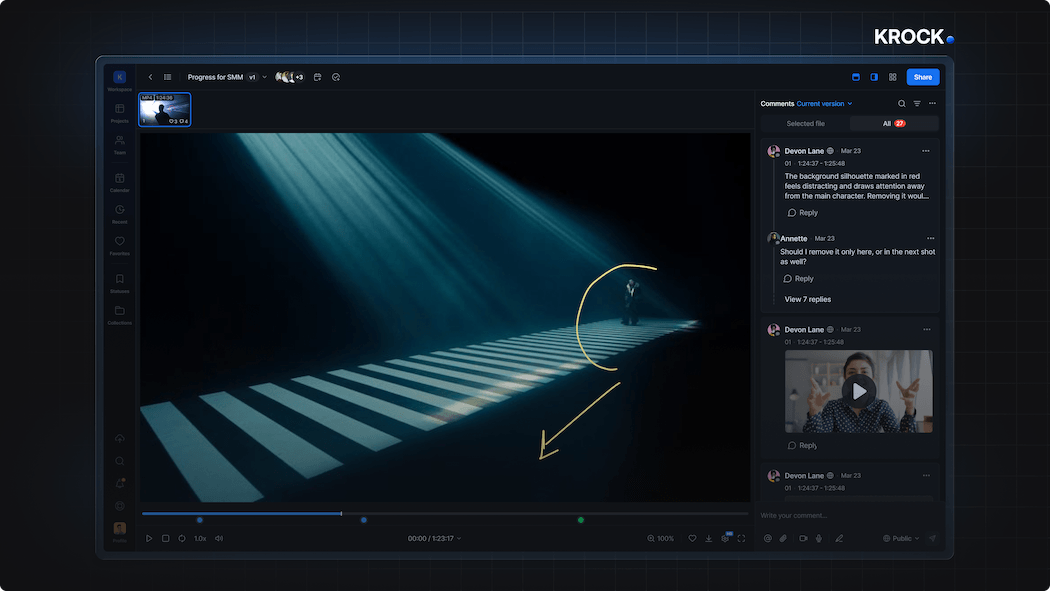
Stills and documents deserve the same treatment video already gets: point-based markup, version history, and a visible record of who approved what. That's standard practice in online proofing software built for mixed-media creative work. It's still missing from most video-first review tools, which treat a PDF as a download link rather than something reviewable in place.
For teams working across both, the gap is the point. A storyboard frame, a key art still, and a rendered cut are all part of the same approval chain on a real project. Splitting that chain across three tools doesn't just cost time. It makes a simple question hard to answer mid-project: what's actually been approved, and what's still waiting on the client?
Building the Habit, Not Just Buying the Tool
Consolidating review doesn't happen automatically the day a new platform gets adopted. It takes a few deliberate habits:
- Pick one system of record for approval status, not a tool for video and a spreadsheet for everything else.
- Route every asset type through it, including the stills, PDFs, and audio files that used to get emailed around separately.
- Set a version-naming convention inside the tool, not in filenames, so "v4_REAL_final" stops being necessary.
- Check the open-comment count every week, not just before a deadline, so nothing sits unresolved across formats.
None of this means abandoning what already works for video review. It means extending the same standard to the rest of what a design or motion team ships: comments pinned to the exact spot, version history that doesn't require guesswork, and a status any team member can check.