Accounting School Website Template
by Revamp
Description
Free premium accounting school website template. Add your content, customize with AI, and publish your website in minutes.
About this template
Help prospective learners understand how your school teaches accounting and where different study paths can take them. The design presents accounting as a way to interpret business activity, communicate clearly, and support decisions.
Visitors can compare pathways in accounting foundations, financial reporting, and practice and advisory. Each path includes a short description and a format or module count, giving learners a useful starting point for deciding what to explore.
Who it’s for
For accounting schools, professional education providers, and instructors presenting accounting courses to aspiring professionals and people building on existing experience.
What’s included
A focused school website that explains its teaching perspective, introduces study options, and gives prospective learners a clear way to ask which path may suit them.
School introduction
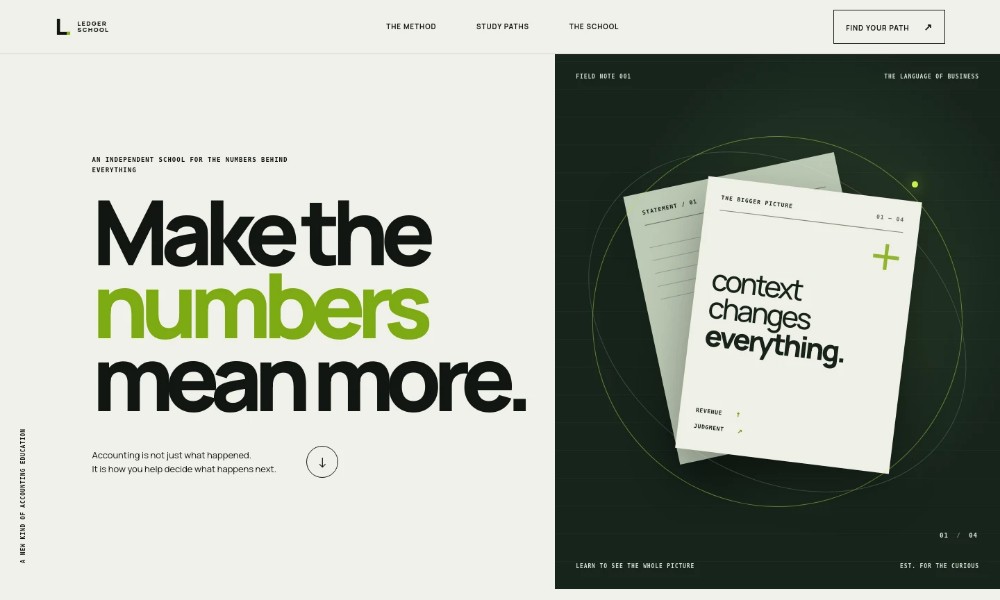
A typographic hero introduces accounting as a way to understand the bigger picture, supported by an abstract ledger-inspired visual.
Teaching method
A three-part method explains how learners can read business statements, develop judgment, and communicate with clarity.
Point of view
A concise statement frames the ledger as a lens for understanding what the numbers are saying, reinforcing the school's educational approach.
Study paths
Three clearly differentiated pathways cover accounting foundations, financial reporting, and practice and advisory. Each shows who it is for, what it covers, and its stated format or module count.
About the school
Dedicated school copy describes lessons that connect accounting fundamentals with business decisions and conversations, along with an emphasis on clear explanations and thoughtful practice.
Learner enquiry
A closing contact section invites visitors who are unsure which path fits to write to the team, giving them a direct next step.
How to use this template
-
Open in Revamp
Click Use this template and sign in or create an account. You’ll start with your own copy of the design, ready to personalize.
-
Bring your content
Replace the sample text, photos, and logo with your own. Share your content, a document, or an existing website, and ask Revamp to adapt the template to your business.
-
Refine and publish
Ask Revamp to adjust the colors, layout, or sections, or edit directly on the page. Review desktop and mobile, then publish. You can keep making changes after launch.
Put your website to work
Support prospective learners and course administration by asking Revamp to add suitable tools for enquiries, scheduling, and managing student information.
-
Schedule introductory conversations
Calendly
Make it easier for prospective learners to find a time to discuss study options. Ask Revamp to add consultation booking with Calendly.
-
Organize course enquiries
HubSpot
Keep track of prospective students and follow-up conversations in one place. Ask Revamp to connect HubSpot for enquiry management.
-
Share course updates by email
Mailchimp
Keep interested learners informed about course dates and school news. Ask Revamp to connect Mailchimp for email communications.
Related Websites
-
TOTD
Debate - Business Consulting WordPress Theme
by peacefulthemes
1767 -
TOTD
Aven – The Multi-Purpose WordPress Theme
by zozothemes
1170 -
TOTD461