Anime Website Template
by Revamp
Description
Free premium anime website template. Add your content, customize with AI, and publish your website in minutes.
About this template
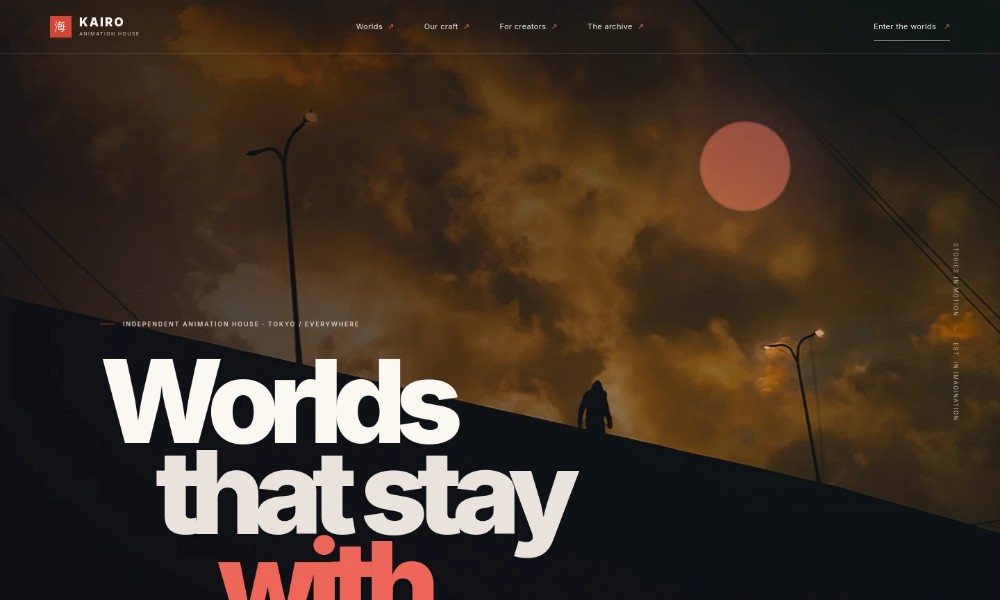
Introduce an anime or animation studio with a cinematic landing page that shows visitors the stories you want to tell, the craft behind them, and how creators can start a conversation.
The design pairs atmospheric story imagery with clear sections for studio perspective, production capabilities, creative partnerships, and an invitation for collaborators. Use it to present your own studio, projects, and contact details.
Who it’s for
Independent anime studios, animation production companies, creative producers, and storytellers looking to introduce their work and connect with collaborators.
What’s included
The page moves from a visual story-led introduction into the studio's perspective, craft, creator invitation, and closing call to action. That progression helps visitors understand the studio's creative focus and find a clear next step.
Cinematic hero
A full-width dusk scene, studio identity, and concise statement introduce the animation house and set an atmospheric tone.
Studio perspective
A short editorial section explains the emphasis on stories that feel real and the lasting impressions they leave.
Story fragment
A cinematic night-platform image and brief caption give the page a visual interlude that evokes the mood of an animated story.
Our craft
Four clearly organized entries describe original worlds, series and feature production, animation and sound, and creative partnerships.
For creators
Storyboard imagery and a direct invitation give artists and storytellers a place to introduce an early idea and begin a conversation.
Closing invitation
A final story-focused message leads visitors toward exploring the studio's worlds or making contact.
Footer
Studio identity, a return-to-top link, and closing details provide a simple end to the page.
How to use this template
-
Open in Revamp
Click Use this template and sign in or create an account. You’ll start with your own copy of the design, ready to personalize.
-
Bring your content
Replace the sample text, photos, and logo with your own. Share your content, a document, or an existing website, and ask Revamp to adapt the template to your business.
-
Refine and publish
Ask Revamp to adjust the colors, layout, or sections, or edit directly on the page. Review desktop and mobile, then publish. You can keep making changes after launch.
Put your website to work
Make it easier to share new work, build an audience, and coordinate conversations. Ask Revamp to add or connect tools such as these when they suit your studio.
-
Share new releases with your audience
Mailchimp
Ask Revamp to connect Mailchimp so you can invite visitors to receive studio news and project updates.
-
Coordinate conversations with collaborators
Calendly
Ask Revamp to add consultation booking with Calendly for creators or partners who want to discuss a project.
Related Websites
-
TOTD1528
-
TOTD
Music App Design
by Softuvo Solutions Private Limited
2005 -
TOTD2497