

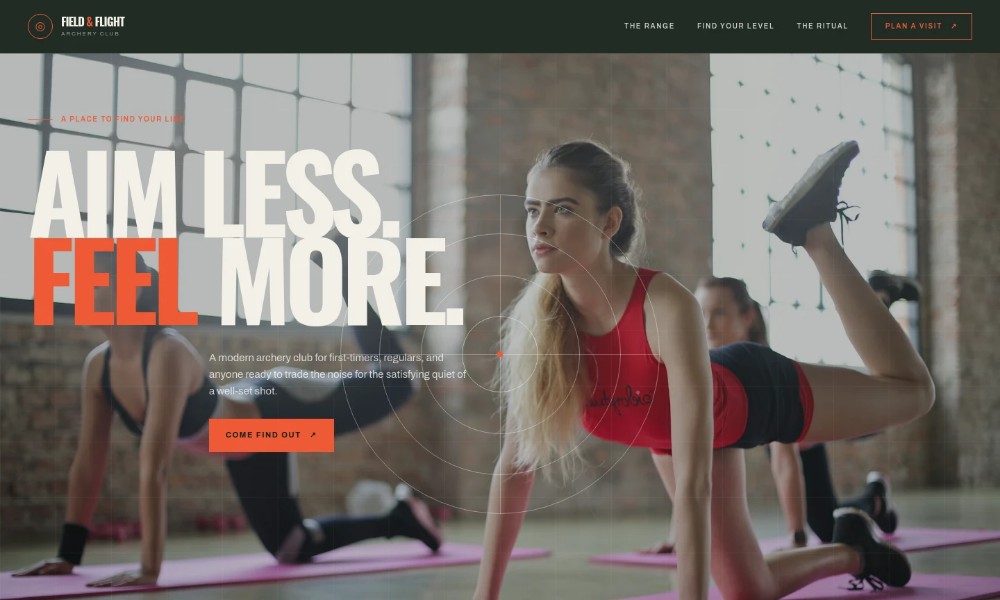
Archery Range Website Template
by Revamp
Description
Free premium archery range website template. Add your content, customize with AI, and publish your website in minutes.
About this template
Help visitors understand what an archery session involves, from a guided first draw to an open-lane visit or a relaxed group session. The page introduces an outdoor range with distance markers, equipment for first-time visitors, and a simple path to ask a question.
A dark, editorial-style hero leads into clear sections about the range, session options, the archery ritual, and planning a visit. The layout gives beginners practical context while helping returning archers and groups find a session that suits them.
Who it’s for
Archery ranges and clubs that welcome first-time visitors, returning archers, and small groups, especially outdoor venues explaining introductory sessions and lane visits.
What’s included
The page guides prospective visitors from a concise introduction to the range through session choices and a direct contact prompt. Its prominent section headings and contrasting panels make the visit options easy to scan.
Hero and range introduction
A full-height opening panel introduces an all-levels outdoor archery club, with a target graphic and a clear route to the range details.
The range
Explains the calm outdoor setting, the progression from close distances, the range's distance markers, and the first-visit introduction and equipment.
Choose a session
Three session descriptions distinguish a guided 60-minute first draw, hourly open-lane time, and a small-group visit for friends or family.
The archery ritual
A photo-led section describes the focus of drawing, breathing, and releasing, giving visitors a sense of the experience beyond the practical session details.
Plan a visit
A prominent closing section invites questions from prospective visitors and provides a contact prompt, with space to confirm range address and hours.
Footer navigation
Repeats the club name and offers a return-to-top link for simple page navigation.
How to use this template
-
Open in Revamp
Click Use this template and sign in or create an account. You’ll start with your own copy of the design, ready to personalize.
-
Bring your content
Replace the sample text, photos, and logo with your own. Share your content, a document, or an existing website, and ask Revamp to adapt the template to your business.
-
Refine and publish
Ask Revamp to adjust the colors, layout, or sections, or edit directly on the page. Review desktop and mobile, then publish. You can keep making changes after launch.
Put your website to work
Make session planning and visitor communication easier by asking Revamp to add booking or contact tools suited to your range.
-
Let visitors reserve sessions online
Calendly
Ask Revamp to add appointment booking with Calendly for introductory sessions or group visits.
-
Keep session availability organized
Google Calendar
Ask Revamp to add scheduling with Google Calendar so visitors can request times that fit your range's calendar.
-
Manage inquiries and follow-up
HubSpot
Ask Revamp to connect HubSpot to organize prospective visitor inquiries and follow-up communications.
Related Websites
-
TOTD
Dance School WordPress Theme
by iamdesigning
2458 -
TOTD2776
-
Vinely - Wine Shop WooCommerce Theme
by Themeganj
1355


