

07 Nov 2026 Theme Of The Day
Armed Forces Association Website Template
by Revamp
Description
Free premium armed forces association website template. Add your content, customize with AI, and publish your website in minutes.
About this template
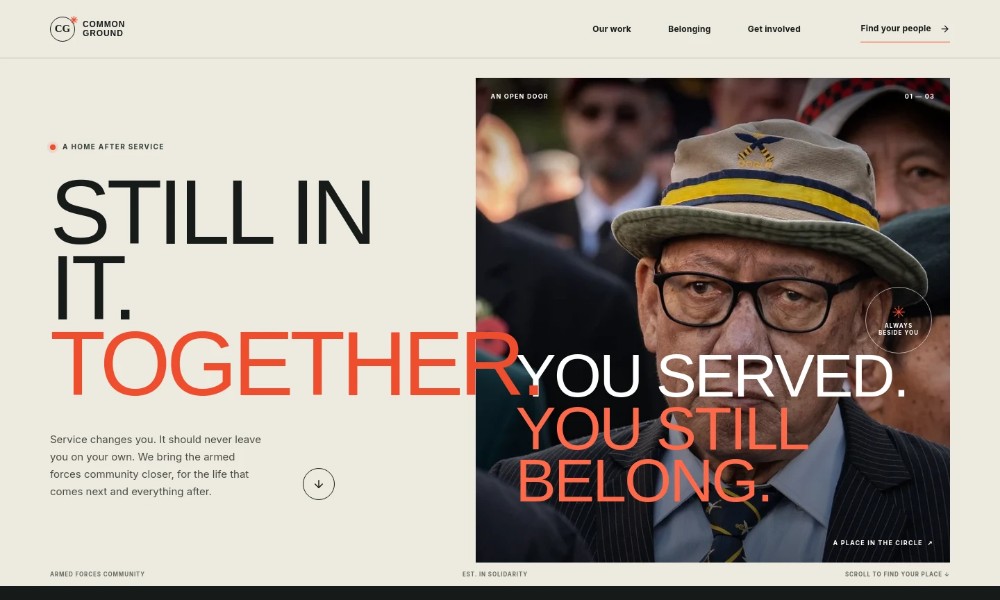
Help veterans, serving personnel, families and supporters understand how your association builds connection beyond service. The design presents belonging, peer support, practical signposting and ways to take part in one clear journey.
A welcoming editorial layout pairs direct messaging with photographs of people together, a prominent list of community activities and a closing invitation to get in touch. It gives visitors a sense of the association’s purpose before asking them to make contact.
Who it’s for
Armed forces associations, veterans’ groups, military family organizations and community nonprofits looking to explain their mission and welcome members, families, volunteers or supporters.
What’s included
The page moves from a clear statement of belonging to specific ways the community can support one another, then closes with an invitation to say hello.
Welcome and mission
A large headline, community photograph and concise introduction establish the focus on connection after service. The prominent call to action directs visitors toward ways to get involved.
Our promise
A statement about lasting belonging explains the association’s purpose, supported by a simple visual connecting service with community.
Support and participation
Four numbered items describe finding peers, exploring practical signposting and peer support, including family, and giving back. This makes the community’s role easy to scan.
Community gathering
A photograph and short passage frame belonging as something people build together, with a link leading visitors toward the invitation to join.
Get involved
A closing section welcomes people who served, those close to someone who served, and supporters, with a direct email contact call to action.
Footer
The footer repeats the association name and tagline and provides a back-to-top link.
How to use this template
-
Open in Revamp
Click Use this template and sign in or create an account. You’ll start with your own copy of the design, ready to personalize.
-
Bring your content
Replace the sample text, photos, and logo with your own. Share your content, a document, or an existing website, and ask Revamp to adapt the template to your business.
-
Refine and publish
Ask Revamp to adjust the colors, layout, or sections, or edit directly on the page. Review desktop and mobile, then publish. You can keep making changes after launch.
Put your website to work
Make it easier to welcome people, coordinate community activities and keep supporters informed. Ask Revamp to add or connect tools that suit your association’s approach.
-
Coordinate events and meetings
Google Calendar
Help members find a convenient time for gatherings. Ask Revamp to add event scheduling with Google Calendar.
-
Manage volunteer interest
HubSpot
Organize supporter inquiries and follow-up in one place. Ask Revamp to connect volunteer contacts with HubSpot.
-
Share association updates
Mailchimp
Keep members and supporters informed about activities and news. Ask Revamp to add email updates with Mailchimp.
Related Websites
-
TOTD2942
-
1401
-
TOTD1695


