Art Museum Website Template
by Revamp
Description
Free premium art museum website template. Add your content, customize with AI, and publish your website in minutes.
About this template
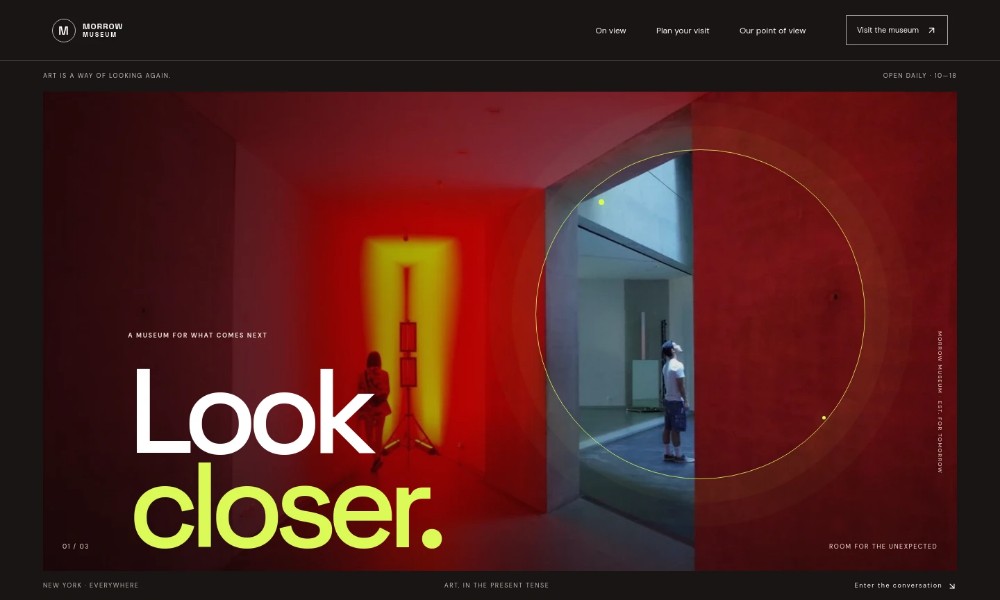
Help visitors discover what is on view, understand the museum’s point of view, and plan a visit. The design opens with a dramatic gallery image, then leads into an exhibition feature, a short introduction to the institution, and practical visitor details.
Editorial typography, generous imagery, and a dark exhibition feature give artworks and exhibition text room to stand out. A three-part section presents the museum’s approach to looking at art, while the visit area gathers address, opening hours, and admission information in one place.
Who it’s for
Art museums, contemporary art institutions, and galleries looking for a considered way to introduce their exhibitions, communicate their perspective, and help visitors plan a visit.
What’s included
The page moves from the museum’s identity and featured exhibition to its approach to art and practical visitor information, helping audiences understand both what is on view and how to visit.
Museum hero
A full-width gallery image, museum identity, and prominent paths to the exhibition and visit information establish the institution and orient visitors.
Museum introduction
A concise statement of the museum’s purpose introduces its perspective and invites visitors to spend time with the art.
Featured exhibition
Exhibition dates, a thematic introduction, artwork imagery, and details about the art forms give visitors a clear sense of the current show.
A way of looking
Three short ideas, notice, stay with the work, and take a new perspective away, explain the museum’s visitor-centered approach.
Plan a visit
A dedicated visitor area presents an address, opening days and hours, admission information, and a visit-planning contact link.
Closing contact
The footer repeats the museum identity and provides a simple way for visitors to get in touch.
How to use this template
-
Open in Revamp
Click Use this template and sign in or create an account. You’ll start with your own copy of the design, ready to personalize.
-
Bring your content
Replace the sample text, photos, and logo with your own. Share your content, a document, or an existing website, and ask Revamp to adapt the template to your business.
-
Refine and publish
Ask Revamp to adjust the colors, layout, or sections, or edit directly on the page. Review desktop and mobile, then publish. You can keep making changes after launch.
Put your website to work
Make it easier for visitors to arrange a visit and for museum teams to communicate with their audience. Ask Revamp to add connections with tools such as:
-
Offer timed-entry reservations
Eventbrite
Help visitors reserve an entry time before arriving. Ask Revamp to add ticket booking with Eventbrite.
-
Keep visitors informed
Mailchimp
Share exhibition announcements and museum news with subscribers. Ask Revamp to connect Mailchimp for email marketing.
Related Websites
-
TOTD
Agrofy Agriculture Webflow Template
by WebflipIn
1378 -
Aerial Photography Website Template
by Revamp
100 -
TOTD1604