Art School Website Template
by Revamp
Description
Free premium art school website template. Add your content, customize with AI, and publish your website in minutes.
About this template
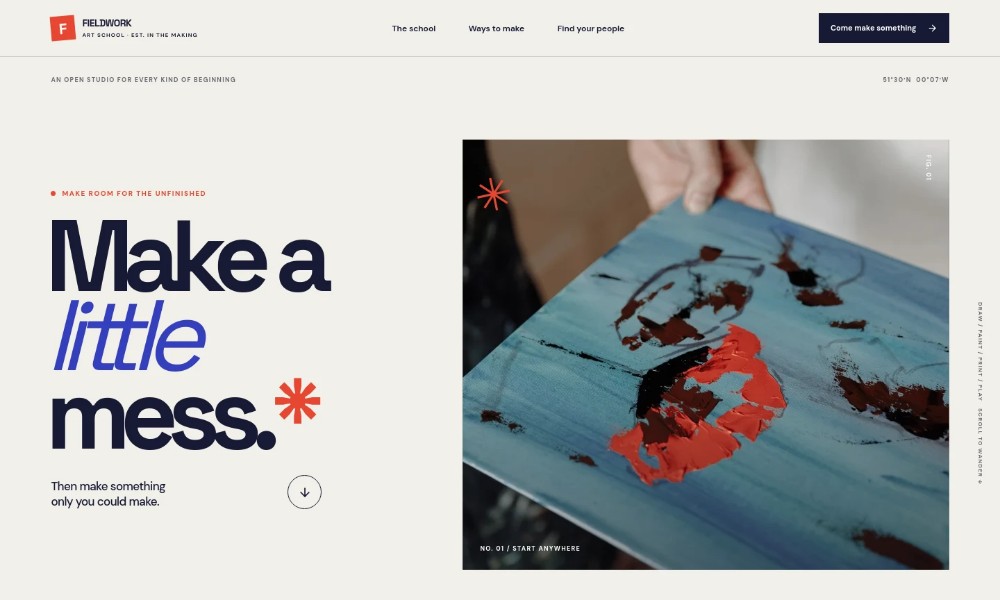
Help prospective students understand what your art school values, what they can try, and how to take a first step. The design introduces a hands-on approach through drawing, painting, print, clay, and personal practice.
Expressive artwork and studio photography set the scene, while clear sections explain the school’s point of view, creative activities, community, materials, and ways to get in touch. The contact invitation makes it easy for visitors to ask about a first session or meet a tutor.
Who it’s for
Independent art schools, community studios, and creative educators offering in-person classes or workshops to beginners and returning makers.
What’s included
The page guides visitors from the school’s creative outlook to examples of what making can involve, then closes with a friendly invitation to start a conversation.
Art-led hero
A large artwork image, concise headline, and navigation introduce the studio’s welcoming, hands-on approach and direct visitors to key sections.
School point of view
A short manifesto explains the school’s emphasis on curiosity and experimentation, with room to describe what students can expect from its tutors.
Creative practice
Three steps move from observation to trying materials and developing an individual practice. Examples include drawing, painting, print, and clay.
Studio and community
A photograph of students sketching together pairs with copy about making alongside other people in a welcoming working studio.
Materials feature
A clay-making image and brief text bring the tactile side of art-making forward, with a link to learn about a first session.
Visit and contact invitation
The closing section suggests visiting the studio, meeting a tutor, or asking which session may suit, with a direct email link.
Footer
Repeats the school identity, offers a return-to-top link, and includes space for illustrative details.
How to use this template
-
Open in Revamp
Click Use this template and sign in or create an account. You’ll start with your own copy of the design, ready to personalize.
-
Bring your content
Replace the sample text, photos, and logo with your own. Share your content, a document, or an existing website, and ask Revamp to adapt the template to your business.
-
Refine and publish
Ask Revamp to adjust the colors, layout, or sections, or edit directly on the page. Review desktop and mobile, then publish. You can keep making changes after launch.
Put your website to work
Make it easier for students to find a class, ask questions, and hear about upcoming workshops. Ask Revamp to add connections that suit how your school handles enquiries and communication.
-
Let students choose a time to visit
Calendly
Ask Revamp to add consultation or studio-visit booking with Calendly, so prospective students can select a time to meet a tutor.
-
Keep class enquiries organized
HubSpot
Ask Revamp to connect HubSpot so your team can manage prospective-student enquiries and follow-up in one place.
-
Share workshop news with students
Mailchimp
Ask Revamp to connect Mailchimp to support email updates about classes, studio events, and upcoming workshops.
Related Websites
-
TOTD
Trimcuts – Barber & Hairdressers WordPress Theme
by zozothemes
176 -
TOTD3362
-
Ashram Website Template
by Revamp
71