

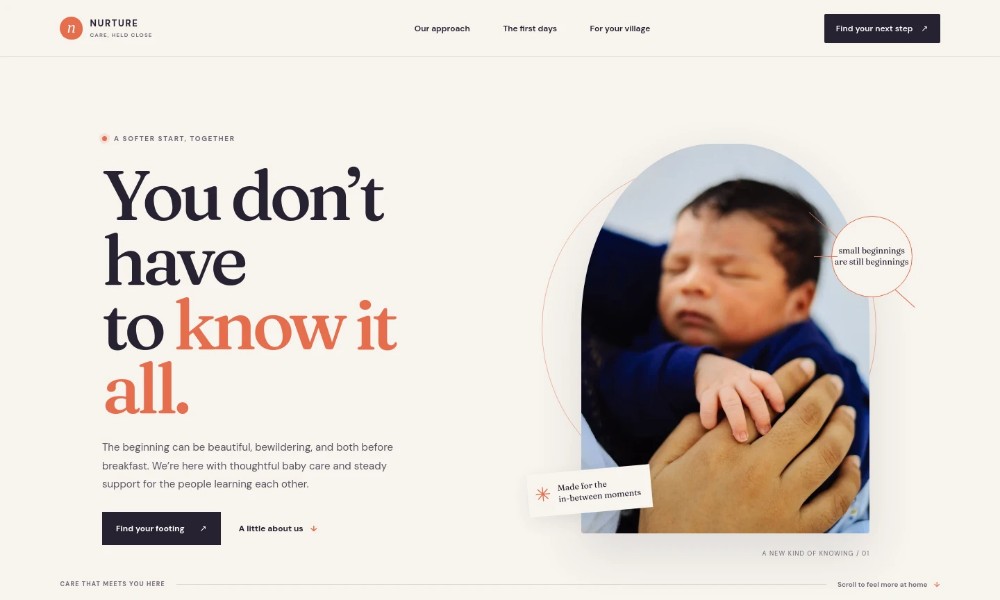
Baby Care Website Template
by Revamp
Description
Free premium baby care website template. Add your content, customize with AI, and publish your website in minutes.
About this template
Help new and expecting families understand your baby care approach, the everyday newborn topics you support, and how to start a conversation. The page introduces practical guidance on feeding cues, soothing, sleep, and bathing alongside support for caregivers and their changing needs.
A gentle, editorial layout pairs warm photography with clear sections about your approach, the first days, and care for a family’s wider support network. A direct contact area gives visitors a clear next step.
Who it’s for
For baby care professionals and family support businesses that want to explain newborn guidance, support for caregivers, and how families can get in touch.
What’s included
The visible page guides families from an introduction to your care approach through newborn care topics and support for the wider family, ending with a first-conversation contact prompt.
Hero introduction
A prominent headline, brief welcome, parent-and-newborn image, and links guide visitors toward the care approach or first-days information.
Care approach
Introduce a flexible, family-centered approach with explanatory copy and a visual rhythm labeled Notice, Try, Adjust, and Begin Again.
The first days
Pair a bath-time photograph with an overview of newborn care, caregiver confidence, and adaptable next steps. Three numbered rows cover these themes.
Care beliefs
A contrasting statement section explains that a good beginning can take different forms and invites families to talk about what they need.
Support for the family
Introduce care for partners, grandparents, chosen family, and other caregivers alongside an outdoor family image.
First conversation
A closing contact section invites visitors to share a question or concern and provides an email link as the next step.
How to use this template
-
Open in Revamp
Click Use this template and sign in or create an account. You’ll start with your own copy of the design, ready to personalize.
-
Bring your content
Replace the sample text, photos, and logo with your own. Share your content, a document, or an existing website, and ask Revamp to adapt the template to your business.
-
Refine and publish
Ask Revamp to adjust the colors, layout, or sections, or edit directly on the page. Review desktop and mobile, then publish. You can keep making changes after launch.
Put your website to work
Make it easier for families to arrange an initial conversation and for your team to manage inquiries. Ask Revamp to add or connect tools such as:
-
Offer a simple way to book a conversation
Calendly
Give prospective families a way to choose an available time. Ask Revamp to add consultation booking with Calendly.
-
Keep family inquiries organized
HubSpot
Track prospective family inquiries and follow-up in one place. Ask Revamp to connect HubSpot for contact management.
-
Coordinate calls and visits
Google Calendar
Keep appointment times visible alongside your schedule. Ask Revamp to connect Google Calendar for scheduling coordination.
Related Websites
-
TOTD
Marblex - Marble & Tiles WordPress Theme
by peacefulthemes
1462 -
TOTD3614
-
TOTD1030


