

Bartending Service Website Template
by Revamp
Description
Free premium bartending service website template. Add your content, customize with AI, and publish your website in minutes.
About this template
Help people planning weddings, private parties, and celebrations understand your mobile bar service, cocktail options, and approach to making the event feel personal.
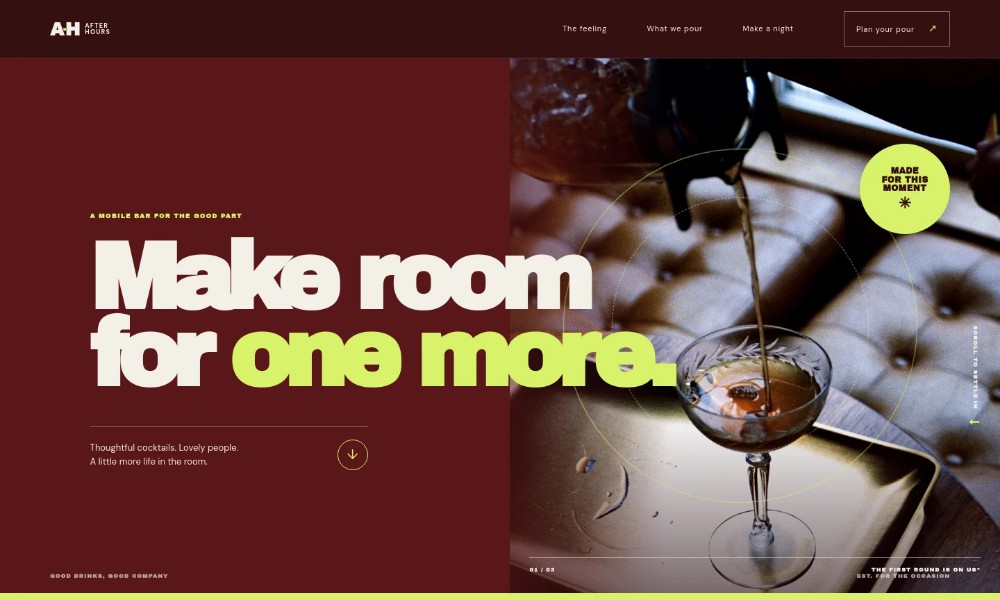
The page leads with a prominent cocktail-pouring image, then explains the service through three clear offerings: a full bar, a custom cocktail menu, and bartending staff. A short planning sequence and direct contact invitation give prospective clients a natural way to start a conversation.
Who it’s for
Mobile bartending businesses and event bartenders serving weddings, private parties, and other celebrations.
What’s included
The design pairs expressive event photography and bold editorial typography with practical service details, so visitors can quickly see what you pour, how the planning is presented, and how to get in touch.
Hero with cocktail photography
A large image of a bartender pouring a cocktail introduces the mobile bar experience, alongside a concise headline and a link that leads visitors into the page.
Service approach
An editorial introduction describes the atmosphere the service aims to create and leads into the specific bar offerings.
Bartending services
Three service entries cover a full bar for gatherings, an occasion-focused cocktail menu with zero-proof options, and bartending staff. The layout gives each offer room for a short explanation and event examples.
Planning steps
A three-step sequence shows the intended planning conversation: share the event details, shape a bar setup and menu, then let the team handle event details.
Contact invitation
A final contact section invites visitors to share their event date, celebration, and location, with email links and a clear prompt to begin a conversation.
Footer navigation
The closing area repeats the brand mark and offers a back-to-top link.
How to use this template
-
Open in Revamp
Click Use this template and sign in or create an account. You’ll start with your own copy of the design, ready to personalize.
-
Bring your content
Replace the sample text, photos, and logo with your own. Share your content, a document, or an existing website, and ask Revamp to adapt the template to your business.
-
Refine and publish
Ask Revamp to adjust the colors, layout, or sections, or edit directly on the page. Review desktop and mobile, then publish. You can keep making changes after launch.
Put your website to work
Make it easier to manage event inquiries and keep planning details in one place. Ask Revamp to add or connect tools that fit the way you book and coordinate events.
-
Schedule event consultations
Calendly
Give prospective clients a way to choose a time to discuss their event. Ask Revamp to add consultation booking with Calendly.
-
Keep event inquiries organized
HubSpot
Track prospective clients and follow-up conversations in one place. Ask Revamp to connect HubSpot for contact and inquiry management.
Related Websites
-
TOTD4448
-
TOTD3016
-
TOTD
Dance School WordPress Theme
by iamdesigning
2445


