BBQ Website Template
by Revamp
Description
Free premium bbq website template. Add your content, customize with AI, and publish your website in minutes.
About this template
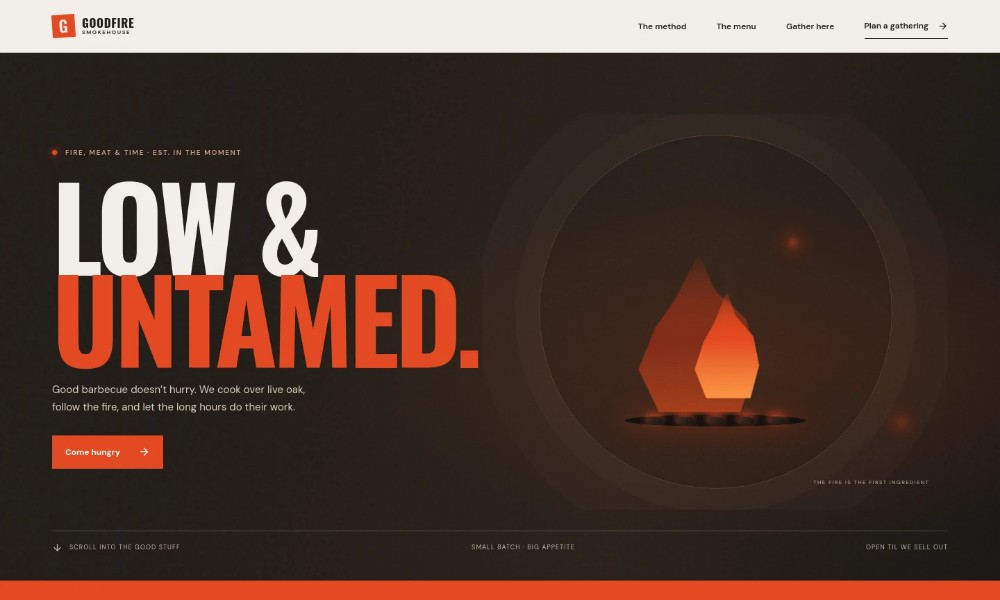
Help diners understand your barbecue style before they arrive. The design introduces live-fire cooking, wood and time as the method, then names brisket, pork ribs, and daily market sides so visitors know what to expect.
A bold smokehouse look pairs oversized type and ember-inspired details with a close-up cooking photo. The menu and gathering sections give hungry visitors a clear path from learning about the food to getting in touch about a group meal.
Who it’s for
For barbecue restaurants, smokehouses, pitmasters, and BBQ caterers who want to introduce their cooking approach, show menu highlights, and invite diners to discuss gatherings.
What’s included
The page is arranged around the questions a barbecue guest is likely to have: how you cook, what comes off the pit, and how to bring a group together.
Fire-led hero
A prominent smokehouse headline and short introduction explain the live-oak, live-fire approach. An illustrated fire graphic and a direct link to the menu make the concept and next step easy to spot.
The cooking method
A focused section puts wood and time at the center, with references to post oak, live fire, and a long cook. Its concise treatment suits a story that is best explained plainly.
Food and menu highlights
Introduce brisket, pork ribs, and market sides alongside a photo of a cook at the grill. The menu strip helps visitors scan the featured dishes and cooking style at a glance.
Gatherings and contact
A closing invitation speaks to group meals and celebrations, with a contact link for visitors ready to talk barbecue. The section makes the gathering offer visible without crowding the food story.
Smokehouse navigation and footer
Navigation links take visitors to the cooking method, menu, and gathering information. A compact footer repeats the smokehouse identity and provides a route back to the top.
How to use this template
-
Open in Revamp
Click Use this template and sign in or create an account. You’ll start with your own copy of the design, ready to personalize.
-
Bring your content
Replace the sample text, photos, and logo with your own. Share your content, a document, or an existing website, and ask Revamp to adapt the template to your business.
-
Refine and publish
Ask Revamp to adjust the colors, layout, or sections, or edit directly on the page. Review desktop and mobile, then publish. You can keep making changes after launch.
Put your website to work
Make it easier to turn interest into a visit or group inquiry. Ask Revamp to add connections with tools that support restaurant bookings, customer updates, or payments.
-
Make table reservations easier
OpenTable
Give diners a direct way to request a table. Ask Revamp to add reservation booking with OpenTable.
-
Keep guests informed
Mailchimp
Share menu updates, opening news, or event announcements with your customer list. Ask Revamp to connect Mailchimp for email marketing.
-
Take payments for group orders
Stripe
Give customers a convenient way to pay a deposit or an order balance. Ask Revamp to add payment collection with Stripe.
Related Websites
-
TOTD1703
-
TOTD
Simphy- Multipurpose Muse Landing Templates
by Tektheme
2773 -
Templezen - Temple React Website template
by Themeganj
1551