Flying School Website Template
by Revamp
Description
Free premium flying school website template. Add your content, customize with AI, and publish your website in minutes.
About this template
Help prospective students understand how flight training works, what they will learn, and how to take a first step. This design introduces a flying school through its teaching approach, training stages, and an invitation to discuss an introductory flight.
A full-width aircraft image, confident typography, and a clear progression from teaching principles to training details give visitors a guided introduction to the school. A first-flight contact section and practical beginner questions help people consider what starting out involves.
Who it’s for
Flying schools, flight academies, and independent flight instructors who want to explain their training approach and invite prospective students to get in touch.
What’s included
The page leads visitors from an aviation-focused introduction through the school's teaching philosophy and training outline to a first-flight inquiry.
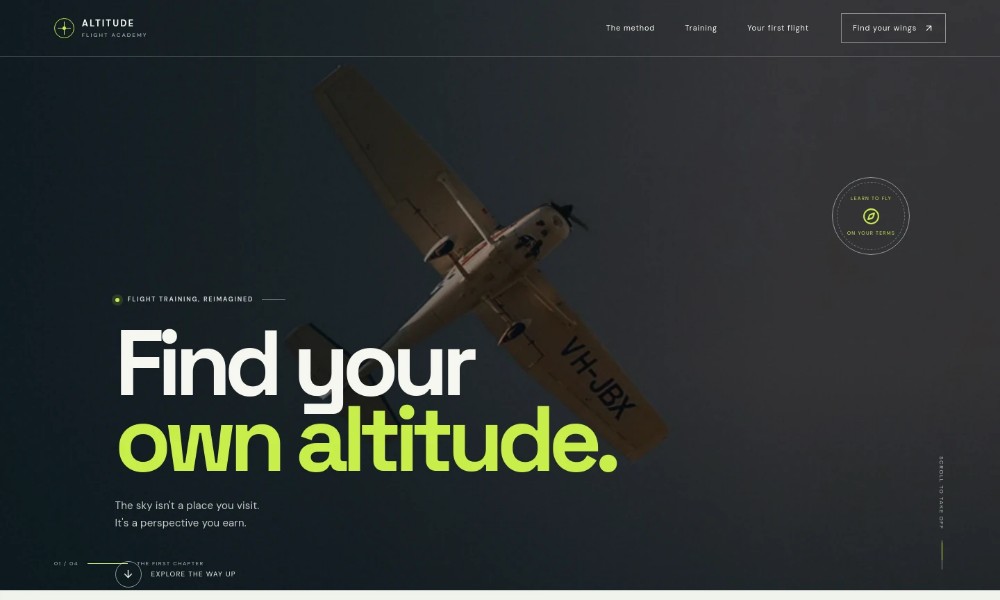
Flight school hero
A prominent aircraft-in-flight photograph, a short headline, and a link into the page establish the flight-training focus and direct visitors to learn more.
Teaching approach
An introductory statement and three principles describe learning the reasoning behind flight, progressing at a personal pace, and taking an active role in the cockpit.
Training overview
A cockpit photograph accompanies an explanation of practical instruction and a three-stage outline covering ground school, dual instruction, and solo readiness.
Flight perspective
A large aircraft image and brief reflective copy provide a visual pause between the training overview and the next-step information.
First-flight inquiry
A contact prompt invites prospective students to discuss their questions and what learning to fly could look like. The section also addresses prior experience, how training begins, and what to bring.
Navigation and footer
Navigation links point to the teaching approach, training, and first-flight sections. The footer repeats the school identity and provides a back-to-top link.
How to use this template
-
Open in Revamp
Click Use this template and sign in or create an account. You’ll start with your own copy of the design, ready to personalize.
-
Bring your content
Replace the sample text, photos, and logo with your own. Share your content, a document, or an existing website, and ask Revamp to adapt the template to your business.
-
Refine and publish
Ask Revamp to adjust the colors, layout, or sections, or edit directly on the page. Review desktop and mobile, then publish. You can keep making changes after launch.
Put your website to work
Make it easier to manage prospective student inquiries and coordinate introductory flights. Ask Revamp to add connections with tools such as:
-
Schedule introductory flights
Calendly
Give prospective students a way to request an available time. Ask Revamp to add introductory-flight booking with Calendly.
-
Organize student inquiries
HubSpot
Keep prospective student details and follow-ups organized. Ask Revamp to connect your inquiry process with HubSpot.
-
Track training administration
Google Sheets
Organize student and training information in a familiar spreadsheet tool. Ask Revamp to connect a workflow with Google Sheets.
Related Websites
-
Academy Website Template
by Revamp
57 -
TOTD1616
-
TOTD
Caranger - Transportation Website Template
by peacefulthemes
5946