Modeling School Website Template
by Revamp
Description
Free premium modeling school website template. Add your content, customize with AI, and publish your website in minutes.
About this template
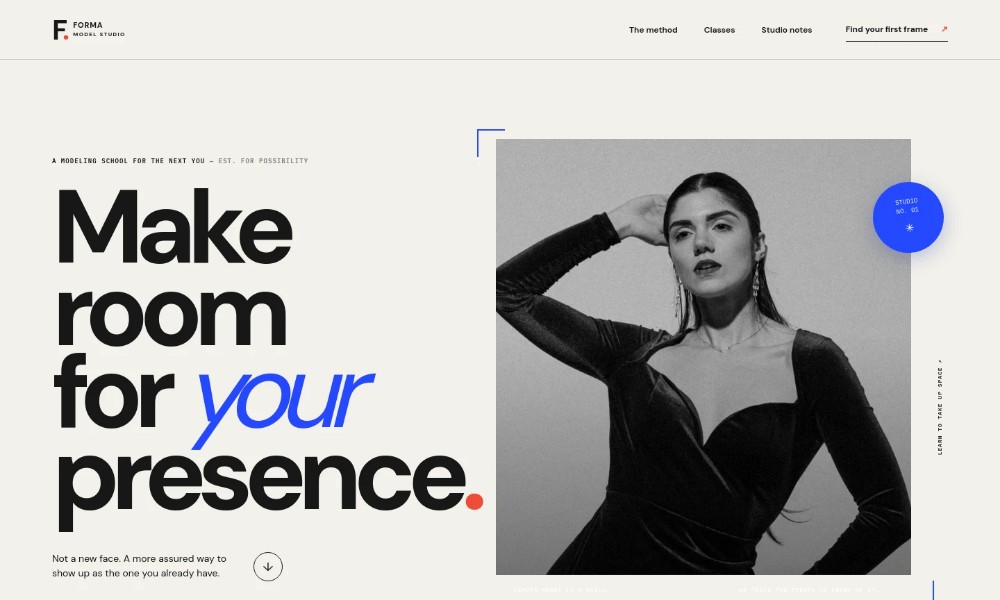
Help prospective students understand how your modeling school teaches camera presence, movement, and working on set. The page presents a clear method alongside course options, so visitors can see what they might learn and where to begin.
The editorial black-and-white photography and oversized typography give the design a focused studio feel. A featured image, step-by-step teaching approach, and distinct class listings make the school’s offer easy to follow, while the closing contact section invites a personal conversation.
Who it’s for
Modeling schools, model studios, and instructors offering beginner modeling classes, on-set preparation, or portfolio guidance.
What’s included
The page guides visitors from the school’s point of view to its teaching method, class options, and a contact invitation. Its course rows provide space to explain each class and help prospective students identify a starting point.
Studio introduction
A large editorial portrait, a concise statement about building presence, and a clear link into the school’s approach introduce the modeling program.
Teaching approach
A short point-of-view section explains modeling as more than posing, followed by a method organized around noticing, choosing, and owning a moment.
Method and studio imagery
A second studio photograph accompanies details about reading light and the set, responding to direction, and developing a personal point of view.
Classes
Three sample course listings distinguish a four-week foundations class, a six-week editorial class, and one-to-one portfolio guidance, each with a brief description.
Contact invitation and footer
A closing prompt encourages visitors to ask about classes, with a contact link and a footer for the studio identity and contact details.
How to use this template
-
Open in Revamp
Click Use this template and sign in or create an account. You’ll start with your own copy of the design, ready to personalize.
-
Bring your content
Replace the sample text, photos, and logo with your own. Share your content, a document, or an existing website, and ask Revamp to adapt the template to your business.
-
Refine and publish
Ask Revamp to adjust the colors, layout, or sections, or edit directly on the page. Review desktop and mobile, then publish. You can keep making changes after launch.
Put your website to work
Make it easier for prospective students to ask questions, choose a time to speak, or stay informed about upcoming classes. Ask Revamp to add or connect tools such as these.
-
Schedule introductory conversations
Calendly
Let prospective students choose a convenient time for a conversation about classes. Ask Revamp to add consultation booking with Calendly.
-
Organize student inquiries
HubSpot
Keep track of prospective students and follow-up conversations in one place. Ask Revamp to connect HubSpot for inquiry management.
-
Share class updates
Mailchimp
Send prospective students updates about class dates and studio news. Ask Revamp to connect Mailchimp for email newsletters.
Related Websites
-
TOTD1605
-
TOTD
Overlap - The Fashion eCommerce Store Template
by Spacingtech Webify
2375 -
TOTD2364